Hope is Not a Strategy: The 3-2-1 Backup Rule for the Self-Hosting User
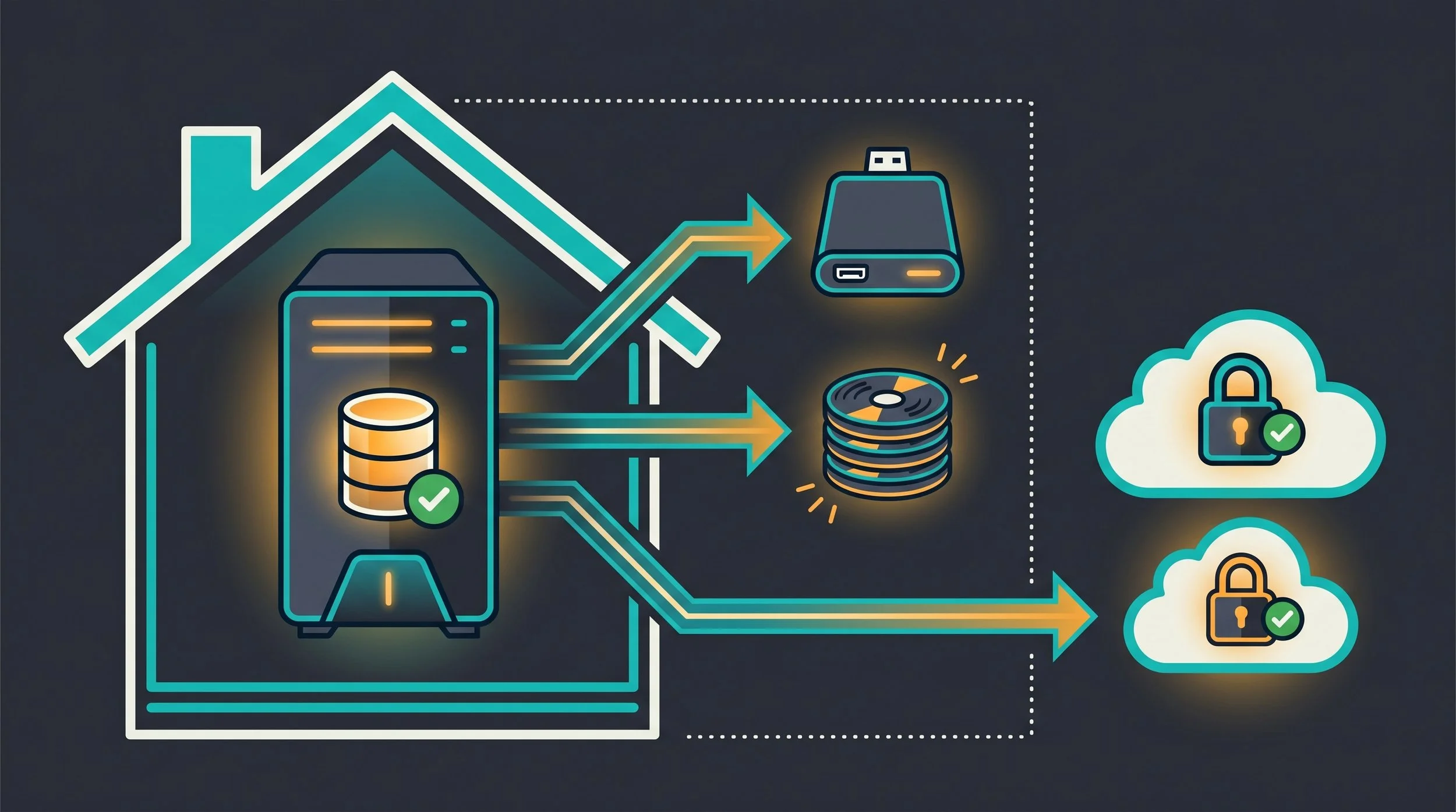
By S’Bussiso Dube/SourceBox Team
Imagine the moment: your primary drive clicks and dies. Or perhaps a botched update wipes your Proxmox configuration. Or, in the worst-case scenario, a ransomware attack encrypts every single folder on your server.
In that moment, you realize the difference between having a copy of your data and having a backup.
For the self-hoster, data loss isn't just an inconvenience; it can be irreversibly catastrophic. If you don't control your backups, you don't actually own your data. To ensure your digital life survives any catastrophe, you need to implement the industry standard for data preservation: The 3-2-1 Rule.
The Foundation: What is the 3-2-1 Rule?
Originating from the work of digital asset expert Peter Krogh, the 3-2-1 rule is the baseline for any serious backup strategy. It is designed to eliminate "single points of failure."
The Rule is Simple:
3 Copies of Data: You should have your primary production data and at least two separate backups.
2 Different Media Types: Store your backups on different types of storage (e.g., one on an internal SSD and one on an external HDD, or one on a local disk and one in a cloud object store). This prevents a single hardware flaw from killing all your copies.
1 Offsite Copy: At least one backup must be in a physically different location. If your house floods or there is a fire, a second backup in the same room is useless.
The Modern Upgrade: The 3-2-1-1-0 Rule
As ransomware and "wiper" malware have evolved, the community has shifted toward the 3-2-1-1-0 standard. This adds two critical layers of protection:
The extra "1" (Immutable/Offline): One copy must be offline (air-gapped) or immutable (Object Lock). This ensures that even if a hacker gains root access to your server, they cannot delete your backups.
The "0" (Zero Errors): A backup is only a backup if it has been tested. The "0" stands for zero errors during a verified restore drill. An untested backup is just a hope.
Puncturing the Myths: What is NOT a Backup
In the self-hosting community, there is a dangerous tendency to confuse availability with recoverability.
Availability is the ability to access your data right now (e.g., your files are on a server and you can open them).
Recoverability is the ability to restore your data after a catastrophic failure (e.g., your server burns down, your account is banned, or a bug wipes your drive).
Many users believe they are protected because they have "redundancy," but redundancy is not the same as a backup. If you rely on any of the following three methods as your only safety net, you aren't backed up; you are simply waiting for a failure you can't recover from.
Myth 1: "I have RAID, so I'm backed up."
RAID is not a backup. RAID (Redundant Array of Independent Disks) protects you against hardware failure (a drive dying), but it does nothing for data failure. If you accidentally delete a folder, or if ransomware encrypts your files, RAID will instantly and faithfully mirror that deletion or encryption across all your drives. RAID ensures your server stays online; a backup ensures your data exists.
Myth 2: "I use Syncthing/Dropbox, so my data is safe."
Sync is not a backup. Tools like Syncthing, Nextcloud Sync, or Dropbox are designed for availability and convenience. The problem is that sync is a two-way street. If a file is corrupted or deleted on one device, that change is propagated to all other devices near-instantly. Syncing is a way to access your data everywhere, but a true backup requires versioning; the ability to go back in time to a version of the file before it was corrupted.
Myth 3: "My snapshots are enough."
Snapshots are not backups. ZFS or Btrfs snapshots are incredible for instant recovery, but they typically live on the same physical storage pool as the production data. If the pool crashes or the server is stolen, your snapshots vanish with the data. Snapshots are an ingredient of a backup strategy, but they are not the whole meal.
The Toolset: Choosing Your Backup Engine
Achieving a 3-2-1 strategy is a journey, not a single event. Depending on your technical comfort level, your available hardware, and how much time you want to spend on maintenance, there are different paths to reaching this goal.
The most important thing to understand is that you are not just choosing a piece of software; you are choosing your Operational Overhead. Some tools give you absolute control at the cost of complexity, while others provide "set-and-forget" simplicity at the cost of a few advanced features.
Here is how to choose the backup engine that fits your specific needs.
The Modern Default: Restic
For most self-hosters, Restic is the logical default. It is a fast, efficient, and transparent CLI tool that focuses on "zero-friction" backups.
The Mechanics: Restic uses deduplication, meaning if you have three copies of the same large file across different folders, it only stores the data once. It also utilizes client-side encryption, ensuring that your data is a ciphered mess before it ever leaves your machine.
The Versatility: Restic is a "backend-agnostic" tool. Whether you want to back up to a local USB drive, an SFTP server, or an S3-compatible cloud like Backblaze B2 or Wasabi, Restic handles it with one single binary.
Who it's for: The user who is comfortable with a terminal, values speed and efficiency, and wants a tool that "just works" across any storage target.
The Veteran's Choice: BorgBackup
If you are looking for the most rock-solid, space-efficient backup tool ever created, you look to Borg. Borg is the "Old Guard" of the self-hosting community; it is mature, audited, and uncompromising.
The Mechanics: Like Restic, Borg focuses on deduplication and authenticated encryption. However, its biggest strength is its Append-Only Mode. When configured correctly, your backup server can be set to allow the client to write new backups but strictly forbid it from deleting or modifying old ones.
The Ransomware Shield: This makes Borg the ultimate defense against ransomware. Even if a hacker gains root access to your main server and wipes your data, they cannot reach back into the Borg repository and delete your history.
Who it's for: The "Power User" who prioritizes absolute data integrity and ransomware resilience over a graphical interface.
The GUI Powerhouse: Kopia
Not everyone wants to spend their Saturday night in a terminal. Kopia is the answer for those who want professional-grade backup power with a user-friendly interface.
The Mechanics: Kopia provides a full desktop GUI (KopiaUI) that handles the complex parts of backup management; snapshotting, pruning, and target configuration visually. It supports the same high-end features as Restic and Borg, including deduplication and multi-cloud support.
The Low Barrier: Kopia allows you to build a sophisticated backup strategy without needing to memorize a single command-line flag.
Who it's for: The user who wants a professional-grade system but prefers a visual dashboard to manage their snapshots and restores.
The Homelab Specialist: Proxmox Backup Server (PBS)
If your Self-Hosted Stack is running on Proxmox VE, using a generic file-backup tool is a mistake. You need Proxmox Backup Server (PBS).
The Mechanics: While Restic and Borg back up files, PBS backs up entire machines. It uses a block-level, incremental backup system that allows you to take a "snapshot" of a whole VM or LXC container in seconds.
The Magic of Instant Restore: Because PBS uses deduplication and a specialized filesystem, you can restore a 100GB virtual machine almost instantly. It doesn't "copy" the data back; it simply links the VM to the existing backup chunks.
Who it's for: Anyone running a Proxmox environment. It is the only way to ensure your infrastructure, not just your data is fully recoverable.
Pro Tip: There is a Proxmox VE community script available to download and set up PBS with ease here.
The "Offsite" Leg: Where to Store Your 3rd Copy
The "1" in 3-2-1 is the hardest part. You need a location that is physically separate from your home.
Critical Tip: If you use cloud storage, use an Immutable/Object Lock bucket. This ensures that even if your account is compromised, the hacker cannot delete your backups.
The "Sovereign" Implementation: 3 Sample Stacks
Knowing the tools is one thing; knowing how to weave them together into a resilient system is another. To help you move from theory to practice, we’ve designed three "Recipes" for your backup infrastructure.
Depending on your technical comfort and your hardware, you can choose the path that fits your life.
Stack 1: The Minimalist (The "Get it Done" Setup)
Target: The user who wants professional-grade protection without becoming a full-time sysadmin.
This stack is designed for those who want a bulletproof system that requires almost zero daily maintenance. It relies on the "S3" standard, which is the most stable and widely supported way to store data in the cloud.
Copy 1 (Production): Your data lives on your primary PC, laptop, or a basic NAS.
Copy 2 (Local redundant): A scheduled Restic job that backs up your critical folders to an external USB HDD. This is your "Fast Recovery" copy—if you delete a file, you grab it from here in seconds.
Copy 3 (Offsite Sovereign): An encrypted Restic repository pushed to Backblaze B2. By using an S3-compatible provider, you ensure your data is stored in a professional data center, but because it's encrypted with your own key, the provider can't see a single byte.
The Glue: Use Backrest (a GUI for Restic) to schedule these backups and Healthchecks.io to send you a notification if a backup fails.
The Result: You have an automated, encrypted, and offsite system that costs a few dollars a month and requires almost no manual effort.
Stack 2: The Homelabber (The "Prosumer" Setup)
Target: The user running a Proxmox node or a dedicated ZFS server who wants a "Zero-Loss" environment.
This stack is for the "Power User." It leverages filesystem level intelligence to ensure that you can recover from anything, from a single corrupted file to a total motherboard failure.
Copy 1 (Production): Data resides on a ZFS pool. You use Sanoid to take automatic, point-in-time snapshots every hour. If you make a mistake, you just "roll back" the snapshot.
Copy 2 (Local Mirror): Use Syncoid to replicate those ZFS snapshots to a second local machine or a separate disk array. This protects you against a single-drive failure.
Copy 3 (Remote Mirror): Use Syncoid (over SSH) or Restic to push the most critical snapshots to a remote server, a friend's node, or a service like rsync.net.
The Glue: A combination of Cron jobs for scheduling and ZFS send/receive for block-level efficiency.
The Result: You have a "Time Machine" for your entire server. You can restore your system to exactly how it was at 2:15 PM last Tuesday, regardless of whether the failure was hardware or human.
Stack 3: The Infrastructure Professional (The "Enterprise" Setup)
Target: The user running a complex environment of VMs and Containers who cannot afford a single minute of downtime.
This is the ultimate expression of the Sovereign Stack. It treats your entire operating environment as a disposable asset—because the backup is so perfect, the hardware no longer matters.
Copy 1 (Production): Multiple VMs and LXC containers running on Proxmox VE.
Copy 2 (The Vault): A dedicated Proxmox Backup Server (PBS) running on separate hardware. PBS uses deduplication (storing only the changes) and Zstd compression to store massive amounts of VM images with tiny footprints.
Copy 3 (The Immutable Offsite): The PBS server uses its native S3 Backend (introduced in PBS 4.2) to sync the most critical backups to an Immutable Object Lock bucket in the cloud (e.g., Wasabi or Backblaze).
The Glue: Native Proxmox integration. You schedule "Backup Jobs" in the Proxmox GUI, and the PBS handles the deduplication, encryption, and offsite replication automatically.
The Result: You have "Bare Metal" recoverability. If your entire server room is destroyed, you can spin up a new Proxmox node, connect it to your PBS vault, and have your entire business back online in minutes.
The Final Rule: The "0" (Zero Errors)
The most expensive backup is the one that doesn't work when you need it.
A backup you have never restored is not a backup, it is a gamble. To move from "hope" to "certainty," you must schedule Restore Drills. Once a quarter, pick a random file or a whole VM and try to restore it to a scratch space.
If you can't restore it, the backup doesn't exist.
The "Sovereign Stack" isn't just about owning your tools; it's about ensuring those tools are reliable. By implementing the 3-2-1-1-0 rule, you ensure that no matter what happens be it a hardware failure, a ransomware attack, or a natural disaster you can rest easy knowing your digital history is safe.
Stop hoping. Start backing up.
Stop renting your digital existence.
Buy a board, spin up a container, take your data back.
